How To
Grow Your Team Faster
Using
One WordPress Plugin
WITHOUT PAYING MONTHLY FEES
Create branded team rotators, distribute traffic fairly among active members, track every click, and manage your entire affiliate team from inside WordPress.
RDP URL Rotator helps affiliate marketers, team builders, and opportunity leaders distribute traffic across multiple participant links, track every redirect, and manage active team members from one simple WordPress dashboard.
Get RDP URL Rotator TodayBuilt For Affiliate Leaders Who Manage Teams
Most link tools simply cloak a URL. RDP URL Rotator does more. It lets you create a single branded mother link and distribute traffic to multiple child links using weighted rotation, active/inactive participant control, and detailed tracking.
Whether you are running a team rotator, promoting affiliate offers, managing traffic co-ops, or preparing for deeper matrix-based placement systems, RDP URL Rotator gives you the foundation to manage link distribution professionally.
Watch The Demo
Step 1: Create Your First Mother Link
Every rotator begins with a Mother Link. Think of it as the master URL that visitors will click before being distributed to participant links.
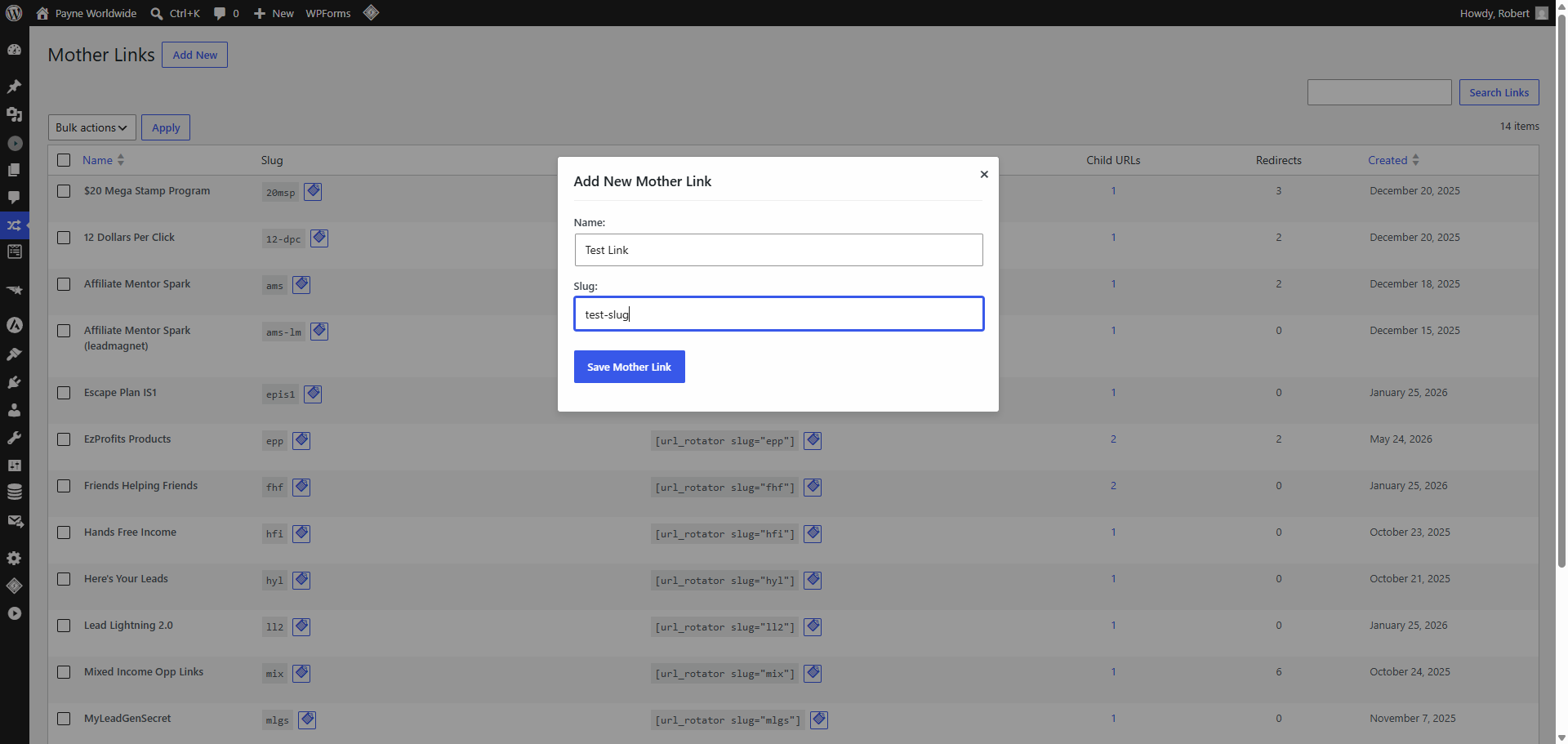
Simply enter a name and slug, save the Mother Link, and you're ready to begin adding participant links.
Step 2: Add Participant Child Links
Once your Mother Link has been created, it's time to add the destination URLs that will receive traffic.
These are called Child Links. Each Child Link represents a team member, affiliate, or participant who should receive traffic from the Mother Link.
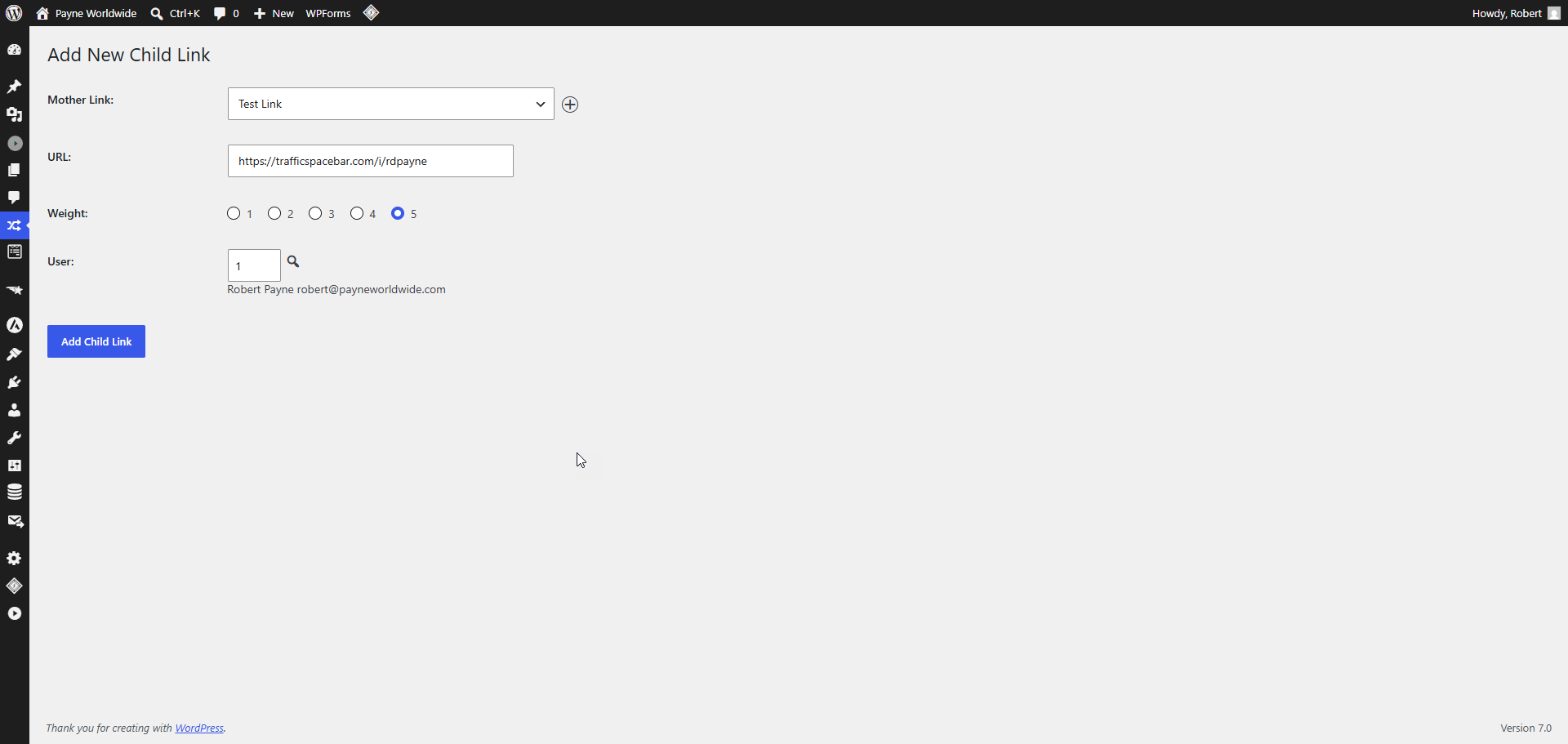
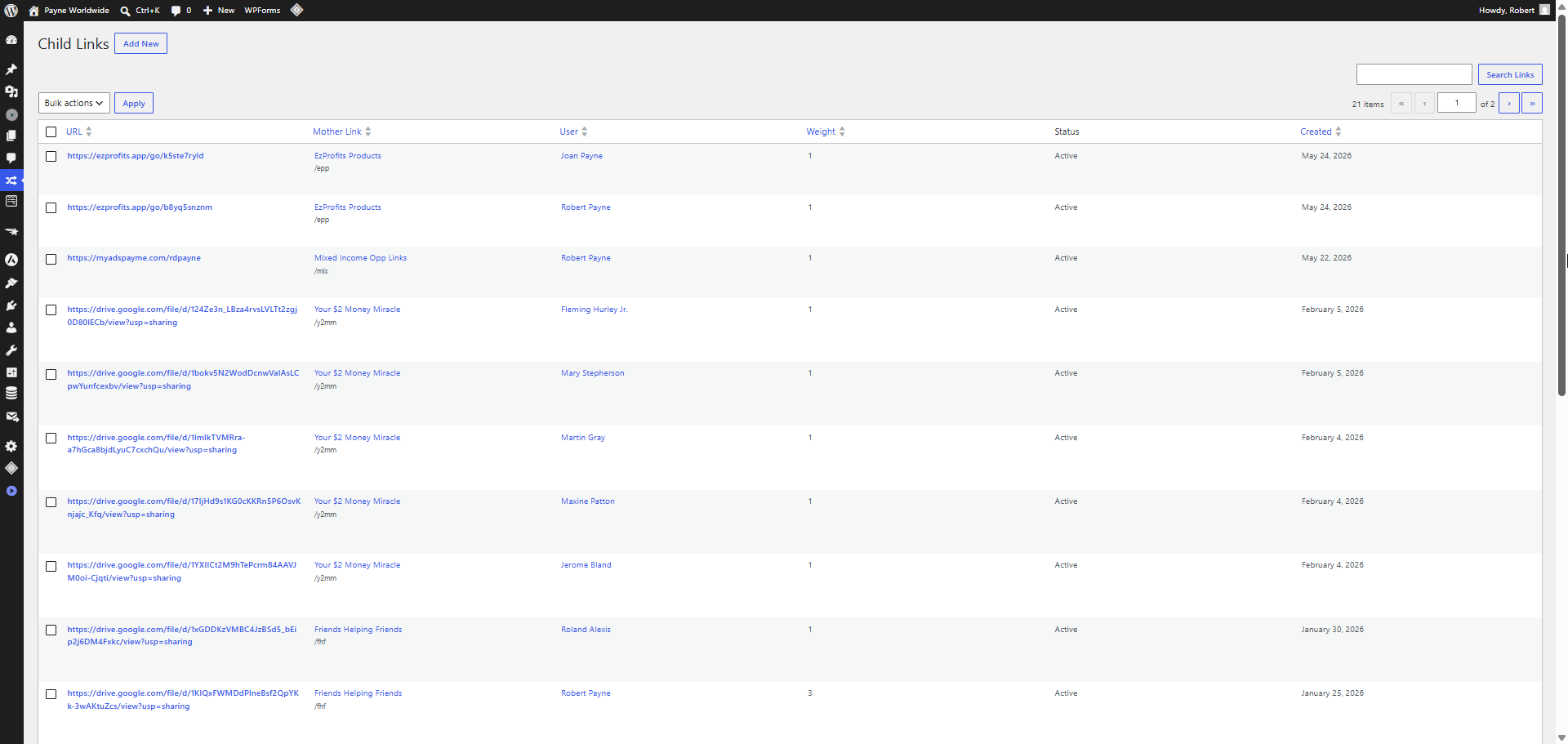
Simply select the Mother Link, choose the WordPress user associated with the participant, enter their referral URL, and save.
Optional: Control Traffic Distribution
You can assign a Weight to each Child Link to control how frequently it appears in the rotation.
Need to temporarily stop sending traffic to someone? Simply mark their Child Link as inactive and the rotator will automatically skip them until they're reactivated.
Repeat the process for each team member you want included in the rotator. Once your Child Links are in place, you're ready to start sharing your Mother Link and distributing traffic automatically.
Step 3: Share Your Mother Link
Once you've created your Mother Link and added your participant Child Links, you're ready to start sending traffic.
Every Mother Link generates a simple, shareable URL that becomes the entry point for all of your traffic. Instead of managing multiple signup links, you only need to promote a single URL.
One Link. Multiple Destinations.
When someone clicks your Mother Link, RDP URL Rotator automatically selects one of the active Child Links based on your rotation settings and redirects the visitor instantly.
The visitor experiences a seamless redirect while your team members receive traffic fairly and consistently.
Promote Anywhere
Use your Mother Link in emails, social media posts, blog articles, YouTube descriptions, forums, and advertising campaigns.
One Link To Manage
Update participant links behind the scenes without changing the URL you're promoting.
Fair Traffic Distribution
Every click is automatically routed according to your configured rotation and weighting rules.
This means you can focus on generating traffic while RDP URL Rotator handles the distribution automatically.
What You Can Do With RDP URL Rotator
Create Mother Links
Create one clean branded URL that can rotate traffic across multiple destination links.
Add Participant Links
Assign child links to users, team members, affiliates, or campaign participants.
Weighted Rotation
Control how often each participant link receives traffic using simple weight settings.
Active / Inactive Control
Pause participants without deleting them. Inactive links are excluded from rotation.
Detailed Statistics
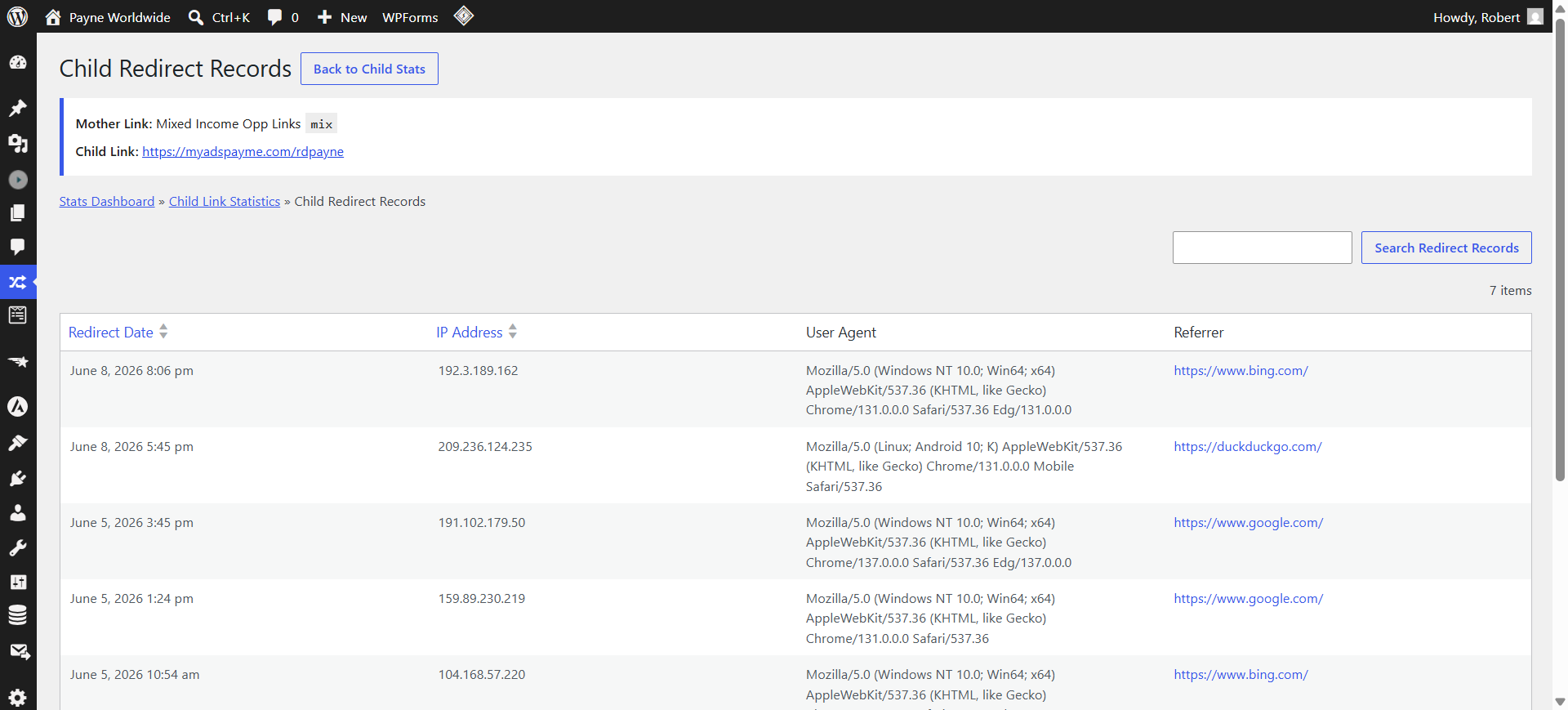
Track redirects, referrers, user agents, IP addresses, and participant performance.
REST API Ready
Use JWT-secured API endpoints to integrate with external systems and future automation tools.
Why Use RDP URL Rotator Instead Of A Free Rotator?
Free rotators can be useful when you're getting started, but as your team grows, the limitations quickly become apparent.
| Typical Free Rotators | RDP URL Rotator |
|---|---|
| Your traffic depends on a third-party service. | Runs on your own WordPress website. |
| Limited control over participant management. | Activate, deactivate, and manage participants yourself. |
| Little or no access to underlying data. | You own your traffic and your statistics. |
| May charge recurring monthly fees. | One-time purchase. No recurring software fees. |
| Cannot be customized. | Extendable through WordPress and REST APIs. |
| Not designed for future automation. | Built for integration with RDP Matrix Filler and other systems. |
The biggest difference?
You own the platform. Your traffic, your participants, your data, and your future integrations all remain under your control.
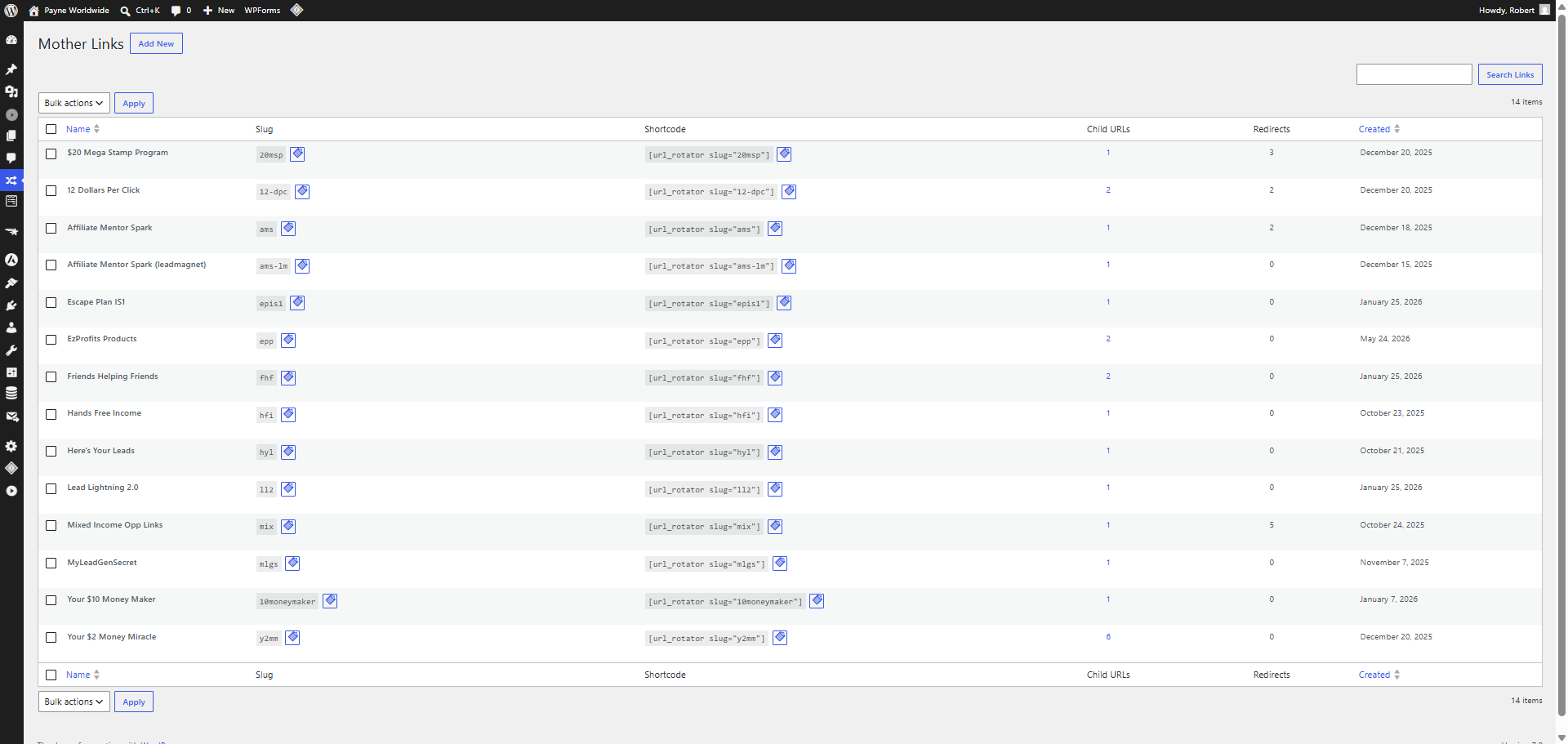
Feature Screenshots
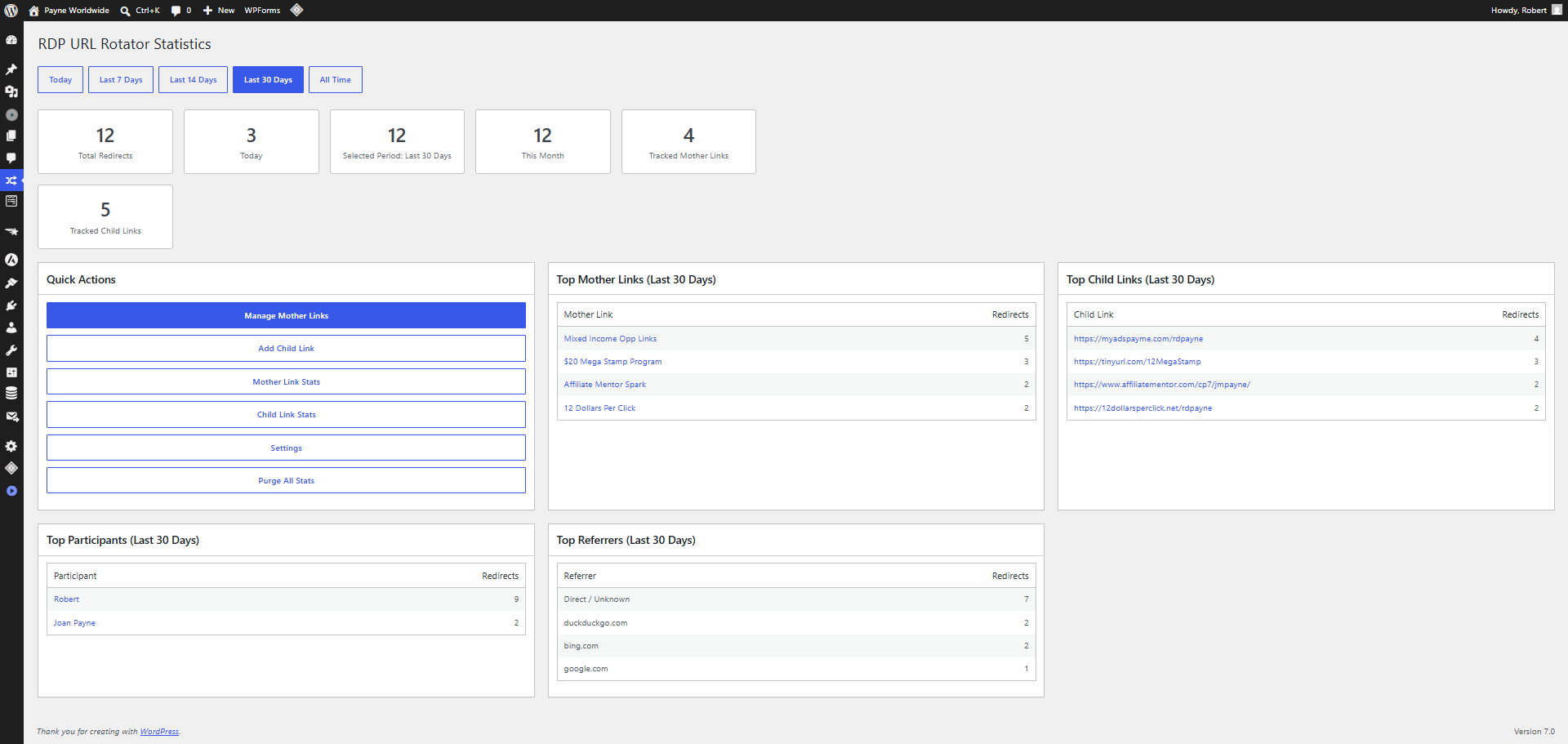
Stats Dashboard
Mother Links
Child Links
Stats Drill Down
Designed For Real Affiliate Workflows
- Create team rotators for affiliate programs and business opportunities.
- Reward active participants by keeping their links in rotation.
- Pause inactive or unqualified members instantly.
- See which links and participants are receiving traffic.
- Track referrers to understand where clicks are coming from.
- Exclude bots and crawlers from statistics.
- Integrate with external tools using protected REST API endpoints.
Built-In Reporting Dashboard
The polished statistics dashboard gives you instant visibility into traffic activity. View total redirects, activity by time period, top mother links, top child links, top participants, and top referrers.
Drill down from high-level stats into individual participant links and redirect records. This gives team leaders the visibility they need to manage traffic distribution with confidence.
API & Matrix Filler Ready
RDP URL Rotator includes a JWT-secured REST API designed for integration with future tools such as RDP Matrix Filler.
External systems can discover opportunities, retrieve participant signup links, check user participation status, and create or update participant child links programmatically.
- Get all mother links
- Resolve mother links by ID or slug
- Get participant status
- Get sponsor signup links
- Create or update participant links
- Retrieve participants for a specific opportunity
Choose Your License
Personal
For individual marketers
- 1 website
- Core rotator features
- Statistics dashboard
- REST API access
Developer
For marketers managing multiple sites
- Up to 10 websites
- All Personal features
- API integration support
- Priority updates
Agency
For teams, agencies, and power users
- Unlimited websites
- All Developer features
- Matrix Filler ready
- Priority support
What Happens After Purchase?
Getting started with RDP URL Rotator is simple. In just a few minutes, you can install the plugin, create your first rotator, and begin distributing traffic to your team members.
Download & Install
Download the plugin ZIP file and install it directly through your WordPress dashboard. Activate the plugin and enter your license details.
Create Your First Mother Link
Create a branded rotator URL that will serve as the central destination for all incoming traffic.
Add Team Member Links
Add participant signup links, assign weights if desired, and control who receives traffic with simple active/inactive settings.
Start Sharing Your Rotator
Promote your branded mother link anywhere online and let RDP URL Rotator automatically distribute traffic to your team.
Track Results
Monitor clicks, referrers, participant activity, and performance through the built-in statistics dashboard.
Grow With Future Integrations
Your purchase includes access to a platform designed for future growth, including REST API integrations and upcoming RDP Matrix Filler support.
Who Is This For?
Affiliate Marketers
Rotate traffic across multiple affiliate links, offers, or campaigns.
Team Builders
Distribute traffic among approved team members and active participants.
Opportunity Leaders
Manage signup links for programs, traffic co-ops, and team promotions.
Stop Managing Team Links Manually
If you are still copying affiliate links into spreadsheets, manually rotating traffic, or guessing which team members are receiving clicks, RDP URL Rotator gives you a cleaner and more professional way to manage affiliate traffic distribution.
Install it on WordPress, create your rotators, add participant links, and start tracking what happens.
Try RDP URL Rotator Completely Risk-Free
We believe RDP URL Rotator can help affiliate marketers, team builders, and opportunity leaders distribute traffic more fairly and efficiently.
That's why every purchase is backed by our 30-Day Satisfaction Guarantee.
Install it. Configure it. Put it to work inside your business. If you decide it's not the right fit for your needs, simply contact us within 30 days of purchase and we'll provide a full refund.
You have everything to gain and virtually nothing to lose.
Frequently Asked Questions
Do I need WordPress to use RDP URL Rotator?
Yes. RDP URL Rotator is a WordPress plugin and requires a self-hosted WordPress website.
Do I need any coding or technical skills?
No. Most users can install the plugin, create a mother link, add participant links, and begin rotating traffic without writing a single line of code.
Can I use it for affiliate marketing?
Absolutely. RDP URL Rotator was designed specifically with affiliate marketers, team builders, opportunity leaders, and traffic-sharing communities in mind.
Can I rotate traffic between multiple team members?
Yes. You can create a single mother link and distribute traffic across multiple participant links using weighted rotation and active/inactive participant controls.
Can I temporarily stop sending traffic to a participant?
Yes. Participant links can be activated or deactivated at any time without deleting them from the system.
Does the plugin track clicks and traffic statistics?
Yes. The built-in reporting dashboard tracks redirects, referrers, participant activity, and other valuable traffic information.
Can I exclude bots and search engine traffic from statistics?
Yes. RDP URL Rotator includes settings that allow you to exclude bots, crawlers, and search engine referrals from your reports.
Do I own my data?
Yes. Because the plugin runs on your own WordPress website, your traffic data, participant information, and statistics remain under your control.
Are there any monthly fees?
No. RDP URL Rotator is a self-hosted WordPress solution. There are no recurring software subscription fees required to keep your rotators active.
Does RDP URL Rotator include a REST API?
Yes. Licensed users have access to a JWT-secured REST API that allows integration with external applications and automation systems.
Will it work with RDP Matrix Filler?
Yes. The REST API foundation has already been built to support future integration with RDP Matrix Filler and other automation tools.
Can I use it on multiple websites?
The number of websites allowed depends on the license tier you purchase. Please refer to the pricing section for license details.
What happens after I purchase?
You'll receive access to the plugin download, documentation, and installation instructions so you can begin building your first affiliate rotator right away.
RDP URL Rotator Is Just The Beginning
RDP URL Rotator is being built as the traffic distribution foundation for a larger affiliate team automation ecosystem.
Available Now
- Fair-share affiliate rotators
- Weighted traffic distribution
- Active/inactive participant control
- Redirect tracking and reporting
- Bot and crawler filtering
- JWT-secured REST API
Coming Next
- RDP Matrix Filler integration
- Automated sponsor selection
- Level-by-level matrix placement
- Participant onboarding workflows
- Smarter team-building automation
Future Expansion
- Advanced participant reporting
- External system integrations
- More API-driven automation
- Enhanced team growth tools
- Additional RDP marketing plugins
Buy RDP URL Rotator today and get the traffic layer that future RDP team-building tools are being designed to build on.